
|
The House of professional Resources Scheduling and Projects Management Software
|
||||



|
Resource scheduling with |
 |
|
If you need to assign technicians to customers demands, or schedule conference rooms, this is the solution for you. This application schedules Resources and the Users of those Resources. All of that is done by drag and drop. You can change an allocation quickly by dragging and dropping the reservation bar. Schedules are displayed as bars. You can make the bars longer, shorter, delete or change them with a single mouse click. Filters allow you to answer the following questions :"Who is working where, when and for which customer " or "What is rented by whom, when and for how long", etc.
|
|
|
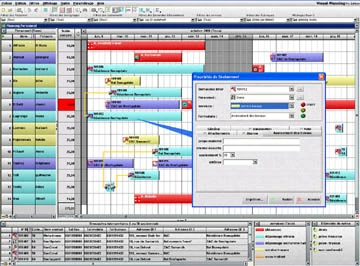
Maintenance team scheduling ( Click on image to enlarge) |
Assign technicians to customers orders In this example, employees are displayed in the lines, while customer orders appear in the bottom window, as a list. The type of activities is indicated by the bar colors.. In this display, a column is automatically recomputed to display in real time the number of holidays stil available for each employee. In this display, the time scale is the hour. |
|
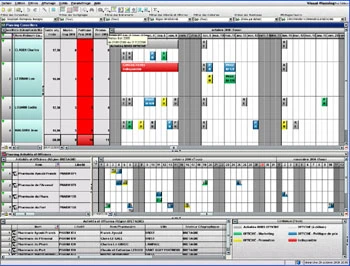
Sales team scheduling ( Click on image to enlarge) |
Schedule sales staff activities, trainings and holidays This display shows two aspects of the same data :The upper window shows sales people on the lines. The customers are listed in the bottom window. When dropped into the Gantt diagram, the client icon become an event, binding the employee an the customer into this event. The diagram displayed in the center of the screen show the reversed schedule, that is customers in the lines, the event in the diagram being the same as in the upper diagram, of course. The time scale in this display is the half day. |
|
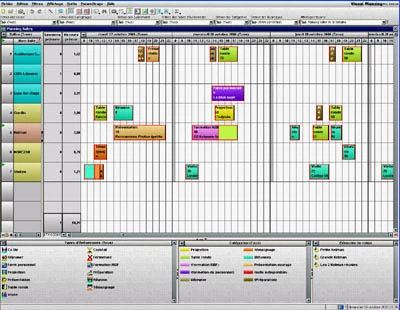
Rooms reservation ( Click on image to enlarge) |
Schedule conference rooms Here we have in the lines different conference rooms, auditorium, meeting rooms and library. Activities ( conferences, projection, meetings...) are shown as icons in the bottom window. Two grey column display the percentage of occupation of the different rooms, and the number of events schduled. In this display, the time scale is the hour. |